hellooo, I want to talk about 'cursors' in point-and-click adventure games. I think this genre is a funny reference pool, as it relies wholly on pointing and clicking, but descends from a wider genre that predates the mouse. The adventure genre evolved with the mouse, seeing it as an easy way to get more people into these great stories. There were some interesting experiments and growing pains though, which will be the point of this post.
Intro and Context
Nomenclature Note: I came up with the title 'a cursory look at cursors' because it sounded funny to me, but thought I might look up the terminology to double check. I was not aware that 'cursor' is a more broad term for any point of focus on a computer screen, like the blinking text line before you type a URL. The arrow icon that is commonly referred to as 'the cursor', while a cursor, is more specifically the 'pointer' (guess why). So I changed the title, and think it still sounds funny.
The Pointing Device: The mouse was not absolutely 'mandatory' until about 1995. It definitely existed prior, and was one of the things that made the original Macintosh (1984) such an adaptable hit. The non-Mac PC world almost exclusively used the non-graphical DOS until the early 90s, when better versions of Windows and OS/2 came about. These PC graphical interfaces had some serious usability issues though, that prevented their massive uptake until Windows 95 released. So, while it may be hard to comprehend a world without one of THE two input devices, this is the context for that.
The Pointing-and-Clicking: A mouse is a simple thing to wrap your head around; your flat plane movements are mirrored on the computer screen, and the button(s) do stuff when pressed, relative to where you moved the pointer icon. It is quicker to adapt to than a keyboard, which typically has a bizarre non-alphabetical layout inherited from typewriters (common letters spread out to prevent jamming). It makes for an easily accessible input for games, particularly the slower-paced adventure genre. Myst proved this to be the case, becoming the world's most popular game until the Sims 1 released (hey, another mouse-forward game). However, the simplicity of the mouse can burden more complex game mechanics and conceptual conveyance. Some games took to complicated menu systems to address this, others expanded the functionality of their cursors with contextual changes. The latter is predominant in point-and-click adventure games, with Myst being a good sample. The cursor/pointer is a little hand that points up, down, or to either side depending on where it is positioned on screen. In turn, you can likely guess (or just test to find out) that clicking will move you in the direction the hand is pointing. Now you know how to traverse Myst, but how does one interact with it? The same way; with the cursor/pointer icon changing contextually based on the item it hovers over. The main issue with this setup is conceptual clarity in the graphic design of icons (some examples of good/bad later). Another common route that some games took was highlighting your cursor when something is interactable, with a click opening a small menu of limited options (look, speak, touch).
Some Games
A few example games (with pictures!) to showcase some ways the point-and-click adventure genre has managed mouse and pointer use.
Noctropolis (1994)
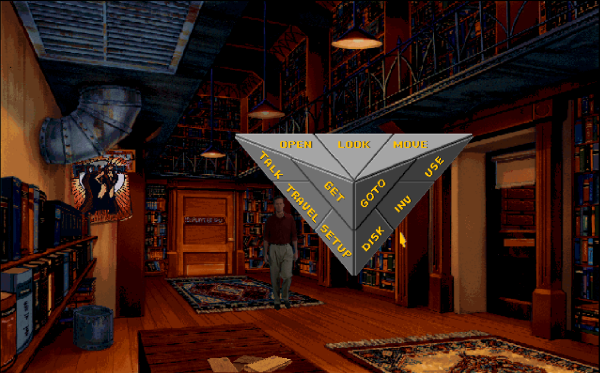
This is an interesting one, wherever you click on the screen opens this huge stylized menu of things to do. It can be played without a mouse too, accomodating DOS users in 1994, with the arrow keys moving the pointer around. The cursor menu can be a bit obtuse and unclear, like how would you walk somewhere? Travel, GoTo, or Move? (I genuinely don't remember). Do you Open or Use a door? or perhaps Travel through it? Requires a bit of trial and error to work all this out (or reading of a manual, which would have come with the physical game to be fair). Anyway, genuine underrated gem, although I will never get over the down-and-out divorced 'loser' character is written as owning a bookshop. That was 'failure' in the 90s I guess, lmao.
Atlantis: The Lost Tales (1997)
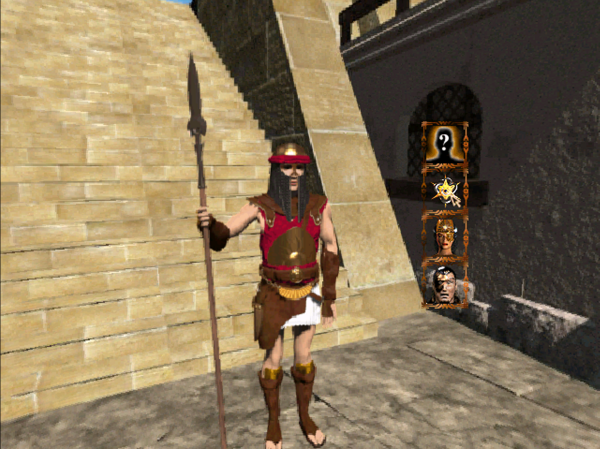
Name one thing in this picture. Atlantis has a stylized blinking gold arrow pointer, that becomes a rotating trail of triangles if hovered over something interactable (not pictured). Once clicked, a cursor menu shows up with picture only icons. Are these questions to be asked? Are they actions to be done? Will picking one over another alter the storyline or gameplay? (yes sometimes) Do I have to exhaust all options just to find out? (also yes). Explaining any of those four picture options requires a lore dump. An obtuse design.
Riven (1997)
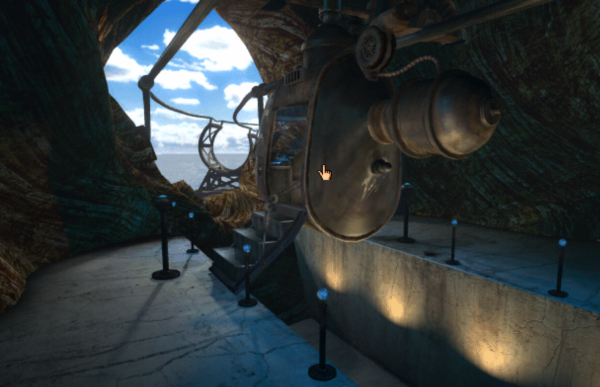
Riven uses the same hand pointer icon as Myst (1993), it was accessible enough that they made no change four years later. They both play in the same way, but Riven has a much larger map and a lot more traversing around. This can be a bit nauseating if done very quickly, a limit of the pre-rendered 3D style.
Blade Runner (1997)
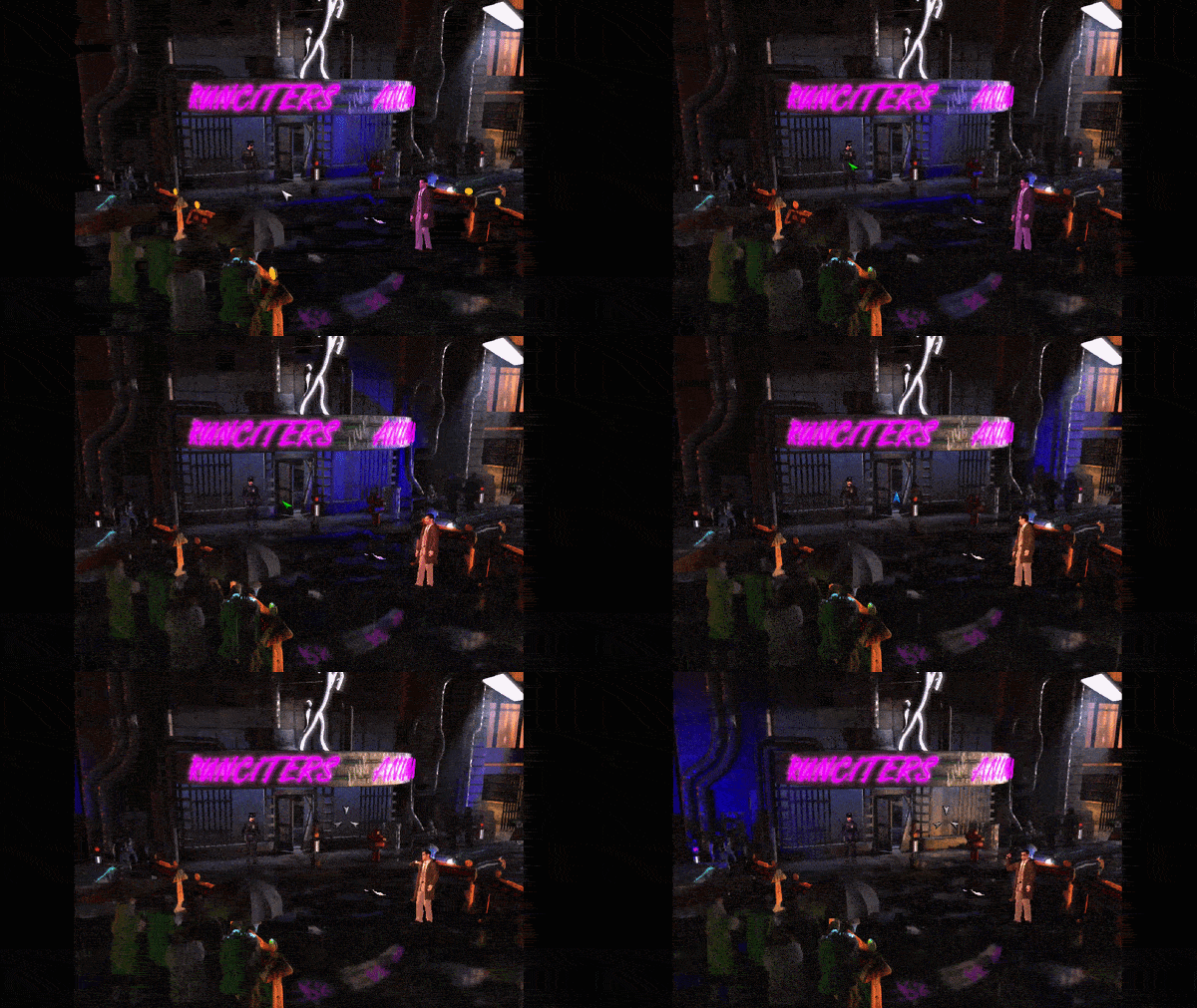
This is probably one of the better examples of a contextually changing pointer, that is simple but conveys clear meaning. You will see in the GIF above; the plain pointer is grey, it then becomes green and spins when something is interactable, blue and bouncing when hovering over an entryway, and finally becomes a three pointed sight when your firearm is drawn. The explainer isn't necessary in game, it is quite intuitive. I think this cursor style is easier with Blade Runner's isometric style of graphics though. It is one of my top 5 favourite games
The Longest Journey (1999)
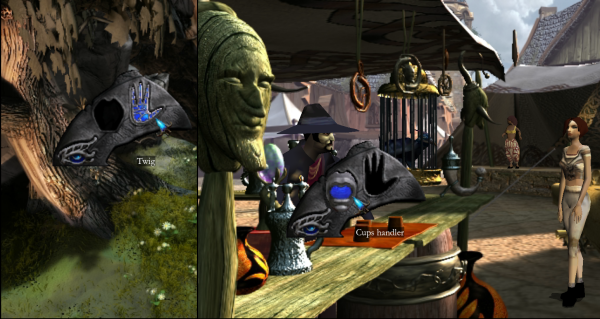
The Longest Journey has a stylized blue pointer, which becomes that deep blue blade icon when something is interactable. Clicking opens the cursor menu with three options represented by simple iconography. The eye looks or inspects, the mouth speaks, the hand collects items or touches. They are beautifully designed, I think the reason the eye and hand look the way they do is that they are of dragon (this will make sense as the game is played). Probably my favourite game ever made, at least top 3.
Dreamfall (2005)
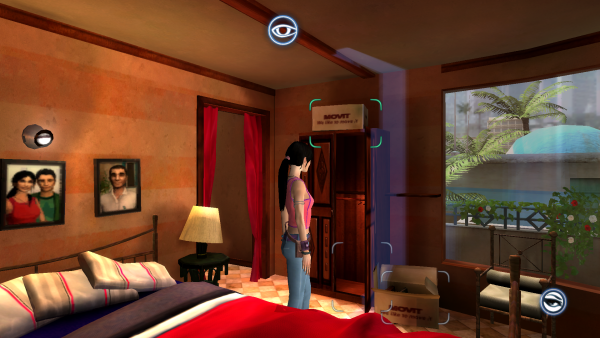
The Longest Journey's sequel, and also probably my favourite game (again top 1-3). The worst part of the game is the control scheme and input style. There is a pointer and an eye/mouth/hand indicator in the bottom right, but mouse movement also effects your third person view (in an inverted way). This is 'solved' with a 'focus mode' that projects a sight line (light blue vertical line) from the now stationary player character, highlighting interactables (the curved dash outlines). You can see in the picture that there are overlapping interactables that would need me to reposition and focus on to catch with this method. The focus mode is enabled with right-click and is controlled by mouse movement/left-clicking. Explaining all of that is probably enough to make anyone reading not bother playing, without hyperbole, THE greatest story every put to video games.
That's all I got, thanks for reading :)