'Izzy'
HP Notebook 15-ac657TX
Current Status: Successfully Re-Homed!
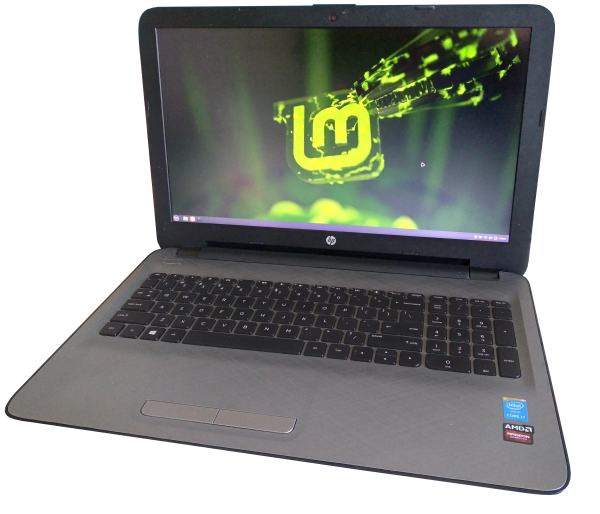
CPU: i7-4510U 2.0GHz x2
GPU: Radeon R5 M330
RAM: 8GB DDR3 (can take 16)
Storage: 512GB SSD
Optical: DVD-RW
Current OS: Linux Mint 22.2 - Xfce
Personal History
Was given this laptop by my Dad in 2025. He had no use for it because he already replaced it, and it was running too slow for him to work with anyway. Battery was also dead and needed replacing.
The slow speed seems like the same problem I had on my Asus Vivobook, where the internal hard disc drive becomes unusably slow after several years. My guess is it's either an average 'capitalism breeds innovation' moment (manufacturers using cheaper parts as time goes on to increase profit), or maybe the HDD gets more vibration and shock damage because modern laptops are typically lighter and more plastic forward. My point of reference for this is my older, sturdier Toshiba Satellite which still has it's original HDD from 2011 running fine.
Likes/Dislikes
This laptop is difficult to look up info for, I've encountered this before with my Asus one, they release about a dozen almost identical laptops at a time with long and complicated model numbers. The official support pages are generic and meant to apply to all of them, as they usually have the same parts compatibility, but this isn't always the case.
Opening this up was actually not too hard, with all the parts are secured to the keyboard layer. You flip it upside down, remove all screws (there's two under some rubber feet, two more under the battery), and pry off the whole bottom piece (gently with a plastic prying tool), then almost everything is clearly accessible. Hard drive and RAM are easy to replace at this point, the keyboard looks like it would be a chore though.
Usage/Plans
- I am fixing this up for a friend, so he can have a reliable laptop with Linux installed to use for study, image & video editing, and pre-2016 gaming. EDIT: have sent it off, and it is working well for him, received a surface pro 7 in trade
Troubleshooting/Testing
- It would not boot from one of the USB ports. I have seen this before with other laptops of this era; some may only allow USB booting from specific ports, or may only boot from a USB 2.0 stick. Just try multiple ports and sticks.
- OS/HDD: Installed Linux Mint 22.1 - Cinnamon as a test, it boots faster than it did with Windows 10, but still over 90 seconds. Once in, the panel and menu are fine but opening apps takes 5-15 seconds. Tested antiX just from USB and that was much quicker, obviously, but I think also because it wasn't drawing from the HDD as much.
- SSD test 1: Replaced the HDD with a cheap second hand test SSD, installed Linux Mint 22.1 - Cinnamon again. Boots within 25 seconds now, and apps are much more responsive taking about 5 seconds to open. Seems to have solved the slowness, as expected.
- SSD test 2: I have now given it a spare 512GB SSD I had and installed Mint 22.2 - Xfce as it's slightly less resource heavy. Installed several useful apps and copied over a bunch of games for it's future owner. Also customized a theme around this background inspired by 'Acid Burn' from Hackers (1995). Mint Xfce's UI is very small on laptops, so I increased font, icon, and window sizes across the board.
Resources
- Installing Software on Linux Mint - overview post by me that might be helpful.
- User Guide from HP support website
- Maintenance & Service Guide from HP support website
- iFixIt.com guide for HP Notebook 15-ay011nr (not the exact model number, but may provide some guidance)
- 'HP 15-ac158dx Keyboard Replacement' iFixIt.com guide (not the exact model, but looks the same inside, will work for replacing keyboard on this model) 45-60 mins, moderate difficulty :(